Taking card payments at events
You can take cards at an event with a mobile card reader, a payment link or a QR code that opens a payment page on the customer's phone. Compare fees and contract terms, test your choice on the pitch, and keep a second method and a small cash float as backup.
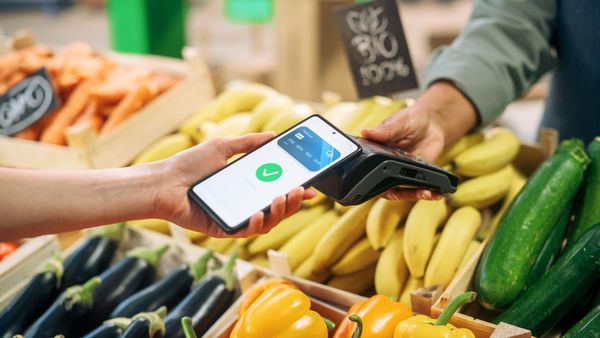
Why most event stalls need to take cards
UK Finance's Payment Markets report for 2025, published in August 2026, says cash made up 8 per cent of all UK payments in 2025, down from 9 per cent in 2024 and 45 per cent in 2015. Debit cards were 54 per cent of payments, and contactless payments, which include cards and mobile wallets, were 39 per cent (see the UK Finance summary and its press release).
The same press release says 65 per cent of UK adults were registered for at least one mobile payment service in 2025, up from 57 per cent in 2024. Shoppers at a market or festival are therefore likely to expect to tap a card or a phone.
In Gala Tent's experience, cash is still king at events, so most traders who take cards also keep cash for customers who prefer it.
Cash has not disappeared. Which? points out that there is no legal obligation for a business to accept cash, because the phrase legal tender has a narrow technical meaning (see Which?: the rules on paying with cash). Whether you accept it is your decision, and many event traders keep it as one of two or three ways to pay.
The main ways to take payment compared
The table compares the generic options. Prices and terms vary by provider, so use each provider's current published terms.
| Option | What the customer does | What you need on site | Watch out for |
|---|---|---|---|
| Mobile card reader | Taps or inserts a card, or taps a phone | A charged reader, usually paired to your phone, and a mobile signal | Battery life, signal, contract length |
| Standalone terminal | Taps or inserts a card | A charged terminal with its own connection | Monthly hire, long contracts, early exit fees |
| Payment link | Opens a link sent to their phone and pays on it | A phone, a way to send the link and a signal on both phones | Typing errors, slower at a busy stall |
| QR payment | Scans a code and pays in a bank or wallet app | A printed or on-screen code and a signal on the customer's phone | Fake codes stuck over real ones |
| Cash | Hands over notes and coins | A float, a secure cash box and a way to bank it | Change running out, theft risk |
Match the method to how your stall sells. A fast queue of small purchases suits a tap-and-go reader, because each sale takes seconds. Larger or less frequent sales, such as deposits on made-to-order goods, can suit a payment link or QR code, because the customer pays at their own pace on their own phone. Whichever you choose, keep a second method available, because every option on the table depends on power, a connection or change.
Our guide to choosing between a card reader and a QR payment goes through the choice in more detail.
Card readers and terminals: fees and contracts
The Payment Systems Regulator, the UK body that oversees payment systems, reviewed card acquiring services in 2021. Its final report said over 95 per cent of acquirers' merchants were on standard pricing, where the provider sets headline rates that recover its costs across a merchant's mix of cards. Headline rates can be a percentage, a per-transaction amount or both, and extra fees can apply for chargebacks, refunds and security-standard compliance (see the PSR final report, November 2021).
The same report gives hardware costs from 2021, which will have moved since. It found that acquirers (the firms that process card payments for merchants) typically charged between £10 and £40 a month to hire a terminal, and that providers selling a reader outright charged between £15 and £45 for it. It found terminal contracts of three or five years, with automatic renewal and early termination fees that can cover all payments due until the term ends. It also found that small merchants who negotiated with their provider were nearly 90 per cent successful at getting a better deal.
Treat these as the shape of the market, and confirm today's figures on each provider's own pricing page. Our guide to payment fees for market traders shows how to compare providers using your own typical day.
At festivals and some other events, Gala Tent's experience is that you may be forced to use the organiser's or provider's card readers, and they will expect a fee plus a percentage of your takings. Ask the organiser before you book whether this applies and what the percentage is.
- Ask whether the reader works offline and what happens to payments if the signal drops.
- Ask how quickly takings reach your bank.
- Check contract length, renewal terms and exit fees before you sign.
- Check whether the reader is tied to one provider's service.
Payment links and QR payments
A payment link or QR code lets the customer pay from their own phone. You need no card hardware, although both of you need a signal. A QR code can be created for each sale with the amount already set, or a single fixed code can be shown where the customer types the amount.
SOTpay and Pay by QR are products of Gala Technology, the group that includes Gala Tent, and this site is run by people at Gala Tent, so read this section with that in mind. SOTpay supports pay by link, where the customer receives a secure link and completes the payment in a protected session using their bank's verification, according to Gala Tent's SOTpay page. Pay by QR generates a unique QR code that the customer scans, then pays through Open Banking, Apple Pay or Google Pay without handheld terminals, according to IBS Intelligence, which reported its expansion beyond car dealerships in August 2025.
SOTpay's own PayGate QR Checkout page describes the flow in four steps: the customer scans a QR code, a secure payment page opens, they choose card, digital wallet or mobile payment, and they complete the payment. The page says codes can be displayed digitally, printed or shared remotely, and that no physical card terminal is needed. It lists retail and pop-up environments and events and exhibitions among its suggested uses. It does not mention market stalls specifically and states no fees or limits, so a stallholder should ask SOTpay about fit and pricing directly. As of November 2026, SOTpay's pay by link page publishes no fees or rates, and says pricing is in its brochure. These are the vendor's own claims.
SOTpay's guide to QR code payments sets out the trade-offs. It lists speed, no need for terminals or cash and fewer queues as advantages. It names fake or tampered QR codes, customers scanning codes from unverified sources and reliance on mobile devices as risks, and says they are low when codes are used correctly. It also explains that customers enter payment details on a hosted page, so the business does not handle card data directly, which the guide says can reduce PCI scope. A practical point for any stall using QR payments is to keep the printed code visible, fixed in place and checked regularly so nobody can cover it with a different code.
Our guide to setting up QR code payments for a stall covers display and testing.
Protect your QR code from fakes
Which? reports that Action Fraud logged £3.5 million lost to QR code scams in 2024. Fraudsters stick fake codes over genuine ones, for example on parking machines (see Which?: quishing scams warning). Which? advises shoppers to check whether a code has been stuck over another and to preview the web address before opening it.
The article gives no stall-specific advice, so the following steps are our practical reading of it.
- Display your code in a holder you can check at a glance, and look at it each time you restock the table.
- Print the payee name beside the code so customers can match it to what their banking app shows.
- Never leave a code unattended overnight or at a shared table.
- Tell customers on your sign which methods you take, so an unexpected code stands out.
Cash, floats and the surcharge ban
GOV.UK's 2012 start-up tips for market stalls say to start the day with plenty of change and to bring a secure cash box or pouch (see GOV.UK: top 10 tips for market stall start-ups). The advice is old and still practical. Our guides to handling cash safely and keeping takings safe cover the detail.
On the size of the float, Gala Tent's advice is that £50 to £75 in notes and coins would suffice, though it depends on your wares or services.
Consumer rules on surcharges apply to you. Business Companion says you cannot add a surcharge for consumer credit or debit cards or for mobile and similar electronic payments (see Business Companion: payment surcharges). The Association of Convenience Stores (ACS) dates the ban on consumer payment surcharges to 13 January 2018 (see ACS: payment surcharging). Put card costs into your prices.
Plan for a weak signal and a changing contactless limit
A reader, payment link or QR payment each needs some connection, so test your set-up on the actual pitch before the doors open. Keep a second method ready, a charged power bank, and enough cash for change. Our guide to what to do when the signal drops covers the fallback steps.
MoneyWeek reports that the Financial Conduct Authority ended the £100 contactless limit from 19 March 2026, allowing banks and payment firms to let customers set their own limits. It adds that most firms are expected to keep their existing limits for the foreseeable future (see MoneyWeek: contactless limit). If a larger sale fails by tap, be ready to ask the customer to insert and enter a PIN or use another method.
Keep records of every sale
GOV.UK says self-employed people must keep records of all sales and income and business expenses, with proof such as till rolls, receipts and bank statements (see GOV.UK: business records if you are self-employed). Card and payment-link takings arrive in your bank account, so keep a daily sheet that records card, link and cash sales separately and matches them to what is banked.
GOV.UK also notes that you may be able to use a personal or business bank account for your records, but you should check with your bank first.
Card payment checklist
- Choose two ways to take payment, for example a reader and cash, or a reader and a QR code.
- Compare fees, contract length and exit terms on each provider's current published pages.
- Charge the reader or phone and carry a power bank.
- Test a small transaction on the pitch before the event opens.
- Check your QR code display for stickers or overlays.
- Show clearly which payment methods you accept.
- Start with a cash float in small notes and coins.
- Record card, link and cash sales separately at the end of the day.
Frequently asked questions
What is the cheapest way to take card payments at an event?
It depends on your sales. The Payment Systems Regulator found in 2021 that fee structures varied between percentage and per-transaction charges, plus hardware costs and sometimes monthly fees. Add up the total on your typical day, divide by your takings, and compare providers on that single percentage using their current published terms.
Do I have to accept cash at my stall?
No. Which? says there is no legal obligation for a business to accept cash. You choose the methods you accept. Many event traders still keep a small float, because a second method helps when a reader fails or a customer prefers notes.
Can I charge customers extra for paying by card?
No, for consumer purchases. Business Companion says you cannot add a surcharge for consumer credit or debit cards or for mobile and similar electronic payments. Include the likely cost of card charges in your prices from the start, and display one price whatever method the customer chooses.
Are QR code payments safe to use at a stall?
QR payments are as safe as the code you display. Which? reports that Action Fraud logged £3.5 million lost to QR scams in 2024, including fake codes stuck over real ones. Keep your code where you can see it, check it regularly and show your payee name next to it so customers can verify who they pay.
What should I do if the card reader loses signal?
Move to your backup method. Keep a second option such as cash, a payment link or QR code, and a charged power bank. Test the connection on the pitch before opening. Ask your provider in advance whether the reader can store payments offline, and what limits and risks apply.
Do I need to record card payments for tax?
Yes. GOV.UK says self-employed people must keep records of all sales and income, including proof such as bank statements and till rolls. Record card, link and cash sales separately each day and match them to your bank, so your Self Assessment figures are straightforward to produce.
Gazebos built for regular pitches
Once a pitch is confirmed, the stall needs to fit it. Gala Tent makes market stall gazebos for traders who set up week after week.
Useful pages on our sister sites
Event Industry Trader is published by Gala Tent. These pages from Gala Tent and the wider Gala group go further on the kit, branding and payments covered here.
Where to check the rules
- SOTpay: PayGate QR Checkout
- SOTpay: Guide to QR code payments
- UK Finance: UK Payment Markets 2026 summary
- UK Finance: digital payments continue to grow
- Which?: what are the rules on paying with cash?
- Payment Systems Regulator: card-acquiring market review final report
- Which?: quishing scams warning
- Business Companion: payment surcharges
- ACS: payment surcharging
- MoneyWeek: contactless limit scrapped
- GOV.UK: business records if you are self-employed
- GOV.UK: top 10 tips for market stall start-ups (2012)
- Gala Tent: SOTpay payment options
- IBS Intelligence: Pay by QR expands beyond auto sales
- SOTpay
- Pay by QR
- SOTpay: pay by link
Rules vary by council and by event. Confirm requirements with the organiser and the relevant authority before you act.